
Practice management that runs your floor, not just your patients.
Every other PIMS is a glorified filing cabinet. DVMLog is the first one built around the four things that actually decide how your day goes: staff, time, productivity, and the client experience. Gemini and Fieldy work the floor in the background, writing SOAPs hands-free and keeping patients moving, while payments, staffing, and marketing run on the same board.
Built and run every day across multi-location hospitals.

Your PIMS tracks the patient. Nothing tracks the practice.
AVImark, Cornerstone, the cloud platforms, they all do the same job: store medical records and push invoices. None of them help you run the team standing in front of those records. DVMLog starts from the other end.
Built for the chart
- × Records and billing first, people second
- × No view of who is waiting, where, for how long
- × Scheduling and time-off live in three other apps
- × Productivity is a guess at the end of the month
- × The front desk and the back never see the same screen
Built for the floor
- → Staff, time, and flow are the product, not an add-on
- → Every room, timer, vital, and stage on one board
- → Schedule, time-off, and reception in one place
- → Time-in-room logged automatically, reported by name
- → One synced screen the whole team reads from
The things every other PIMS treats as an afterthought.
DVMLog is organized around how a hospital actually operates: the people, their hours, their output, and the client on the other side of the door.
Everyone in their lane
Google sign-in with an admin approval gate. Roles for receptionist, tech, doctor, and manager. Nobody sees patient data until they're approved.
Hours and who's on now
Monthly staff schedule, time-off requests, on-duty view, and the reception queue, all visible to the whole team in one place.
Output you can see
Live 15-minute wait alerts, auto-logged time-in-room by doctor, tech, pairing, and complaint, plus a daily production goal you watch fill.
No one left forgotten
Room timers and alerts so no client sits unseen, live cameras on every card, patient photos, and standardized intake language.
Not a whiteboard. The whole floor.
One login covers the treatment area, the kennels, and the diagnostics that used to live in four browser tabs. Every screen here is the live product.
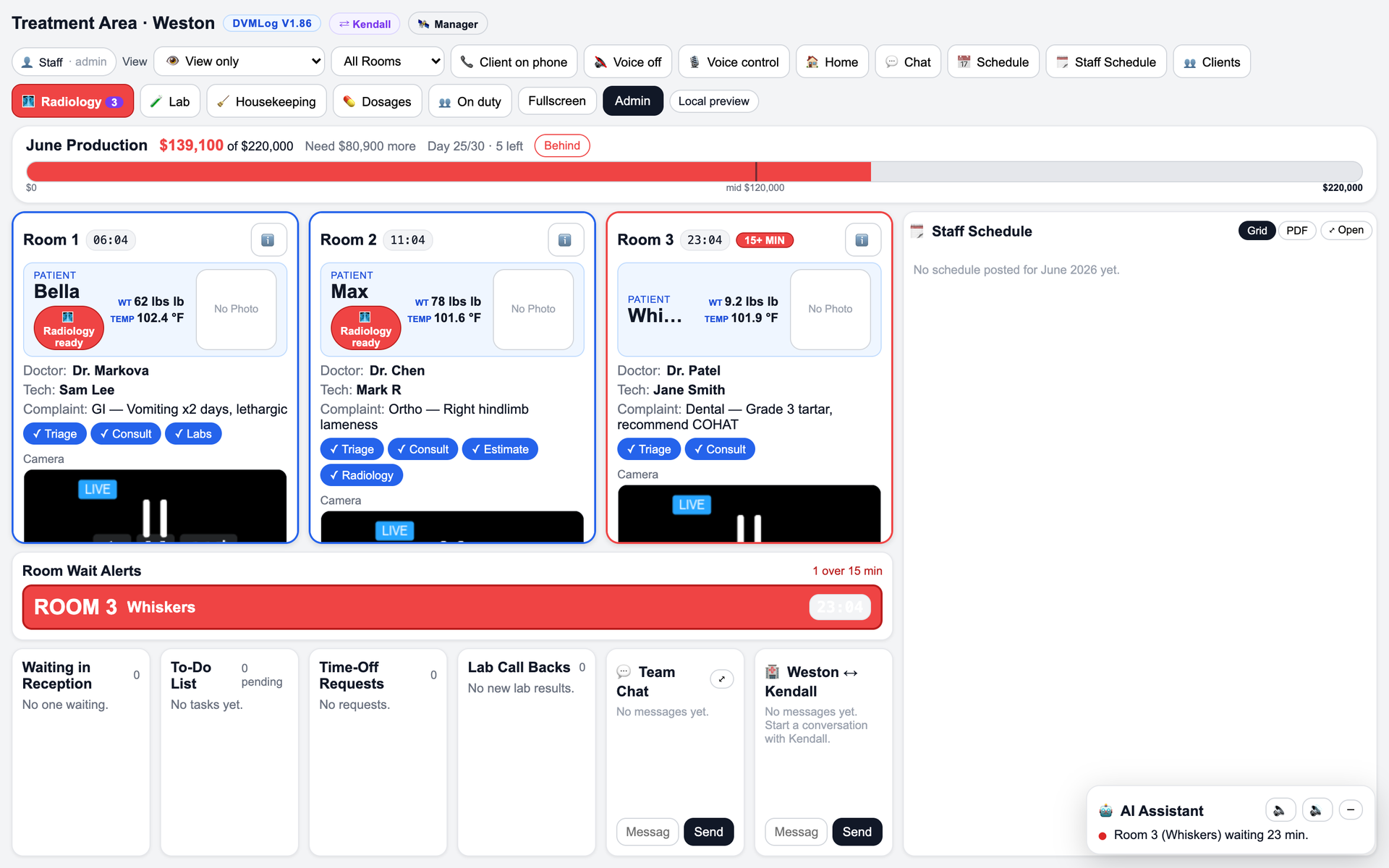
The whole hospital on one screen
Rooms, timers, vitals, doctor and tech, complaint, stages, and a live camera per card. The production bar tracks the monthly goal in real time. Anything over 15 minutes flashes red.
- → Live weight and temp on every patient card
- → Wait alerts and a room-by-room over-15 panel
- → View-only and fullscreen mode for the wall TV
- → Team chat and location-to-location messaging across every hospital
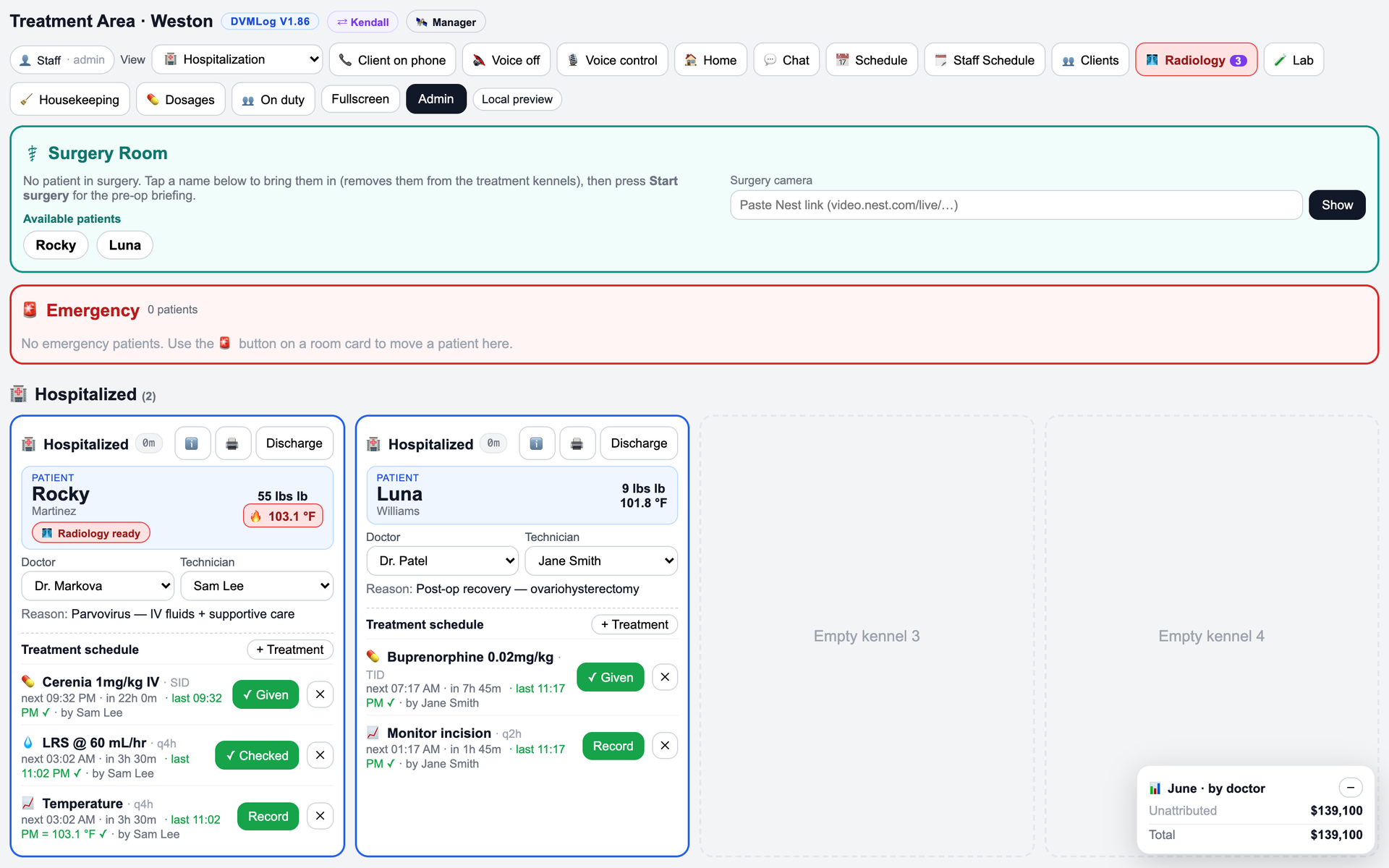
Treatment sheets that run themselves
Inpatient kennels with full treatment schedules. Recurring meds and fluids at SID, TID, q4h, q2h, each with next-due, last-given, and who signed off. Surgery room with pre-op briefing and emergency intake.
- → Med and fluid scheduling with due and overdue tracking
- → Given / Checked / Record sign-offs by name and time
- → Surgery room with Nest camera and pre-op flow
- → Emergency lane and one-tap discharge
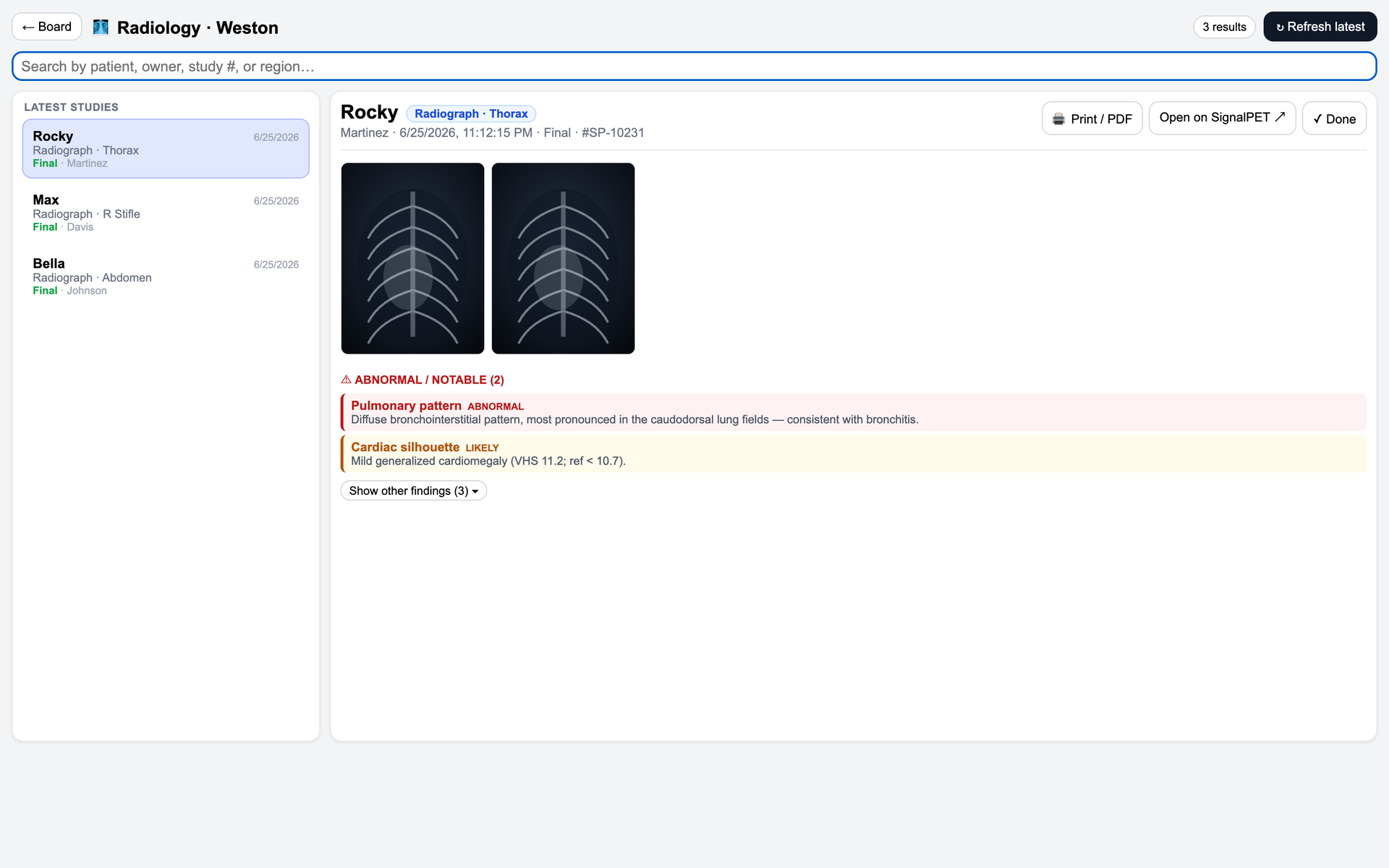
Imaging that reads itself first
Studies land on the board with AI-flagged findings sorted by severity. Abnormal and likely-abnormal results are surfaced up top, so the doctor knows what to look at before they open the film.
- → Abnormal / notable findings called out by severity
- → Search by patient, owner, study number, or region
- → Print/PDF and open straight on SignalPET
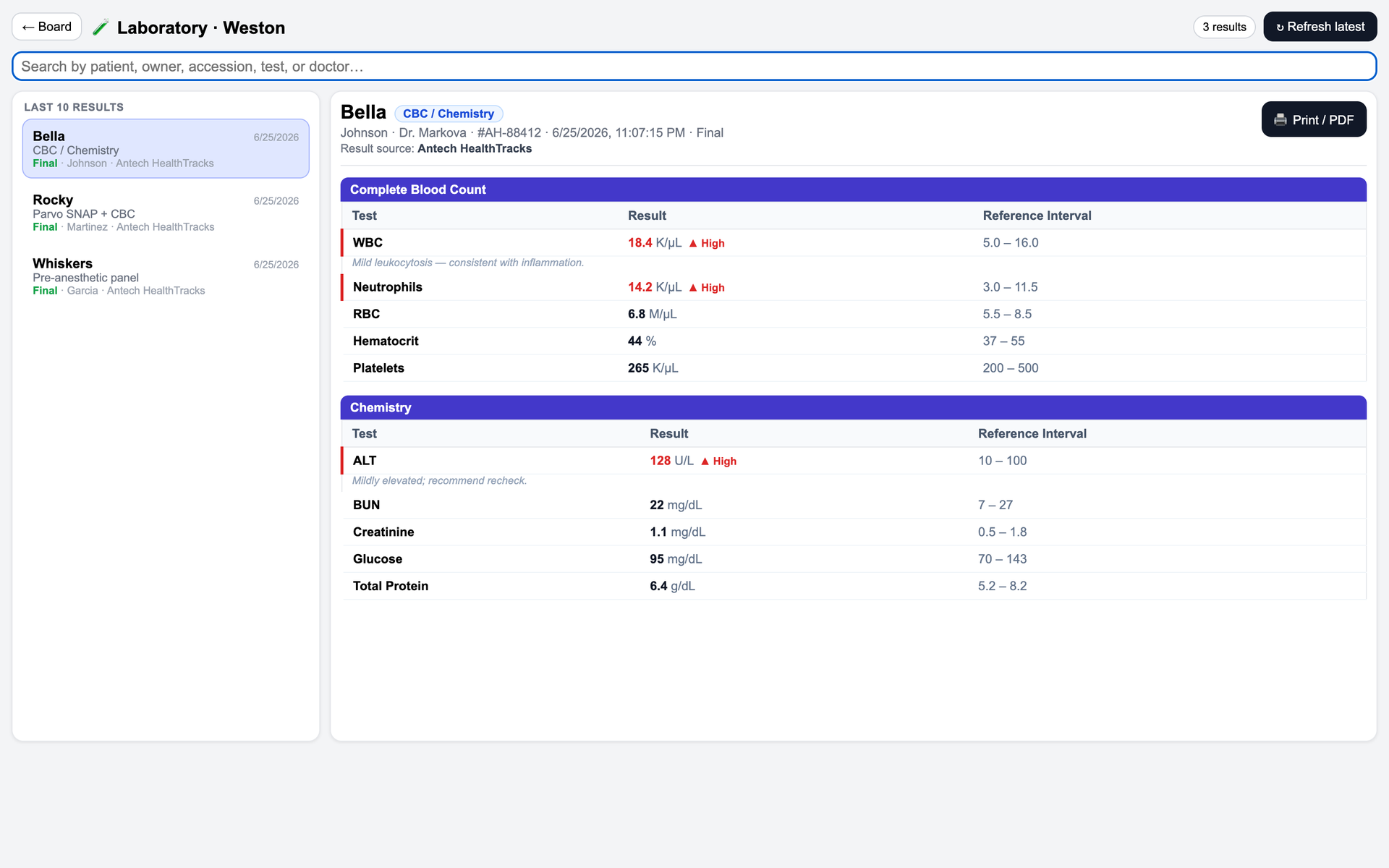
Bloodwork, already interpreted
CBC and chemistry pulled in with reference intervals, high and low values flagged in red, and a plain-language note on what each abnormal means. The last ten results sit one click away.
- → Results in from Antech HealthTracks automatically
- → Out-of-range values flagged with interpretation
- → Lab call-backs tracked right on the board
The SOAP writes itself. No tablet, no typing, hands on the patient.
The doctor wears Fieldy and works the exam like always. DVMLog listens in the background and turns the visit into a structured SOAP note, ready to review before the room is even cleared. Nothing to carry, nothing between you and the animal.
Hands-free and tablet-free
No device to hold, no keyboard in the room. The consult stays about the patient and the client, not the screen.
Ambient, bilingual capture
Natural conversation, English and Spanish in the same visit. Owner history and your exam findings are both picked up.
Structured SOAP in seconds
Subjective, Objective, Assessment, and Plan filled in automatically, with differentials and next steps drafted for you.
You review and sign
Every note is a draft the doctor approves, then it lands straight on the patient record. No copy-paste, no dictation cleanup.
Plugs into what you already run.
In-house analyzers, reference labs, imaging, cameras, payments, and marketing flow straight onto the board. One integration layer, no extra logins, no copy-paste between tabs.
An extra set of eyes on the whole floor.
DVMLog runs Gemini quietly underneath the board. Not a chatbot you go talk to, an assistant that watches the flow and helps both the team and the doctors keep moving.
Watches the queue
The on-board AI Assistant flags rooms going cold and clients waiting too long before the lobby backs up.
Runs hands-free
Voice control updates rooms and stages while gloved hands stay on the patient.
Backs up the doctors
Turns the visit into structured notes in the background, so doctors spend time on patients, not paperwork.
Reads the diagnostics
Surfaces abnormal labs and imaging up top, so nothing out of range gets buried in a panel.
Run the team the way you run the medicine.
DVMLog manages the people side of the hospital with the same rigor it brings to patients: who is on, who is late, what still needs doing, and how fast rooms actually clear.
Geofenced clock-in
Staff can only clock in when they are physically at the hospital. GPS-fenced punches end buddy-clocking and off-site starts.
Tardy auto-warnings
Late or missed clock-ins trigger an automatic notice to the employee and the manager, timestamped and logged for review.
Task management
Assign, track, and close out floor tasks by role and shift. Callbacks, cleaning, and follow-ups stop slipping between people.
Time to clear rooms
Every room's clear time is logged and ranked by doctor, tech, and pairing, so coaching runs on numbers, not impressions.
One of a kind: everything your hospital runs on, in one place.
No other PIMS puts scheduling, online booking, clinical tools, controlled-drug compliance, diagnostics, payments, and marketing on the same board. DVMLog replaces the pile of disconnected apps other systems leave you to stitch together yourself.
Online booking & live availability
Clients book themselves into real open slots from any device. Availability syncs with the board, so the schedule never double-books.
AI-assisted scheduling
Gemini spaces complex cases, fills gaps, and flags a block before it overbooks, so the day does not jam at 10am.
Dosage calculator
Weight-based dosing at the point of care, with drug, concentration, and route worked out for you to cut math errors.
Controlled substances log
A tamper-evident digital log for controlled drugs. Every draw, use, and waste recorded by name, time, and running balance.
The front office and the P&L, handled too.
DVMLog does not stop at medicine. Take payment at the point of care, run marketing that targets your own clients, and keep every order on budget, all on the same board.
Get paid at the point of care
Checkout, deposits, and text-to-pay in the client's hand. Stripe handles the cards and PCI, and DVMLog reconciles it against the visit.
Marketing that fills rooms
Dynamic, data-driven campaigns and recalls pulled from your own patient base, with Google Ads spend tied to new patients. It targets the right clients and adapts to what actually books.
Every order on budget
Set budgets on lab and supply orders, and see cost and client price on every line as you order. Spend stays in plan and estimates stay accurate, in real time.
One patient, start to finish.
The same flow your team already follows, now visible to all of them at once and logged without anyone stopping to write it down.
Check in at reception
The client lands in the reception queue the moment they walk in. Everyone sees who is waiting and why.
Seat them in a room
Tap a room and the patient drops onto the card with their weight and temp. The timer starts on its own.
Move through the stages
Tap each stage as it happens, Triage through Ready. Labs and Radiology auto-start a 15-minute countdown so nobody gets forgotten.
Clear or admit
Clear the room and the full visit time is logged, or send the patient straight to a hospitalization kennel with its own treatment sheet.
Read the reports
Time-in-room sorted fastest to slowest by doctor, tech, pairing, and complaint. See what's working and where to coach.
Everyone else sells it à la carte. We bundle it.
Most practices stitch together a stack of single-purpose subscriptions, each one $100 to $300 a month. There are platforms that charge that much just for an AI scribe, or just for a controlled-substances log. DVMLog includes all of it, for one price per doctor.
Four to six vendors, four to six invoices
- $ AI scribe and SOAP notes, $100 to $300 per month
- $ Controlled-substances log, sold as its own product
- $ Online booking and scheduling, a separate subscription
- $ Payments and terminal, a separate processor contract
- $ Reminders and client texting, another app
- $ Reporting and dashboards, another tool
One platform, one login, one bill
- ✓ Fieldy hands-free SOAP notes, included
- ✓ Controlled-substances digital log, included
- ✓ Online booking, live availability, and AI scheduling, included
- ✓ Stripe payments on the board, included
- ✓ Staff attendance, tasks, and performance, included
- ✓ Labs, imaging, and analyzer integrations, included
Run your floor on DVMLog.
Tell us your practice and we'll get you set up. Built by people who run hospitals, for people who run hospitals.
dvmlog.com · multi-location ready